Salesforce Threekit

Threekit for Salesforce

AI-native CPQ for manufacturers that run on Salesforce. Our Quoting Agent makes it easy for reps, dealers and website buyers to get to a correct quote, integrated with Salesforce.

Built by the team behind SteelBrick, now Salesforce CPQ

Manufacturers that sell with Threekit

Threekit products that work with Salesforce

Keep the Salesforce products you have or replace them. This is what Threekit adds. AI guides the work; your product rules and pricing decide the result.

AI-Native CPQ

Needs analysis, guided selling, configuration, pricing and quoting in one AI-native system. Use it as the CPQ for your Salesforce CRM, or in place of Salesforce CPQ.

AI-Native CPQ →

Quoting Agent

Built for dealers and channel partners. Run it on Threekit's CPQ, or in front of Salesforce CPQ or Revenue Cloud, so partners get to a correct quote without calling your team.

Quoting Agent →

Online buyer experience

Use the systems you already have to give buyers a modern experience online, with their requests reaching Salesforce.

Use cases →

We built BigMachines and SteelBrick. We know CPQ

Threekit's leadership includes the people who built SteelBrick, which Salesforce acquired in 2016 and turned into Salesforce CPQ, and BigMachines, which became Oracle CPQ.

That history means we know how Salesforce models products, price books and quotes, where Salesforce CPQ implementations get stuck, and what manufacturers selling through dealers and websites have had to work around. Threekit is built for that work.

2013

BigMachines, now Oracle CPQ

Acquired by Oracle
2016

SteelBrick, now Salesforce CPQ

Acquired by Salesforce
Now

Threekit, AI-native CPQ for manufacturers

Same team

Get live fast

Go live in one to three months, with a working version on your own products along the way.

What to expect →
~1 week

From loading your data to a working version on your own products

1 to 3 months

To go live once your requirements are defined

Same CRM

Salesforce stays where it is throughout

If you run Salesforce CPQ or Revenue Cloud

Salesforce no longer sells Salesforce CPQ to new customers and names Revenue Cloud Advanced as its successor. Existing customers can keep using and renewing it, with critical fixes but no new features.

Whether you stay on Salesforce CPQ, move to Revenue Cloud or replace both, there are two ways to work with Threekit.

Keep your CPQ and add the Quoting Agent in front of it

The Quoting Agent takes on the work before the quote. Salesforce CPQ or Revenue Cloud keeps pricing, the quote and approvals.
Threekit does
  • Turns the customer's request into a valid configuration: needs analysis, guided choices, your rules checked as you go
  • Shows the product as it is configured
  • Gives dealers and website visitors the same guided experience your reps get
Salesforce CPQ or Revenue Cloud keeps doing
  • Pricing, the quote document and approvals
  • Products, price books and quote records
  • Reporting and the rest of your Salesforce workflow
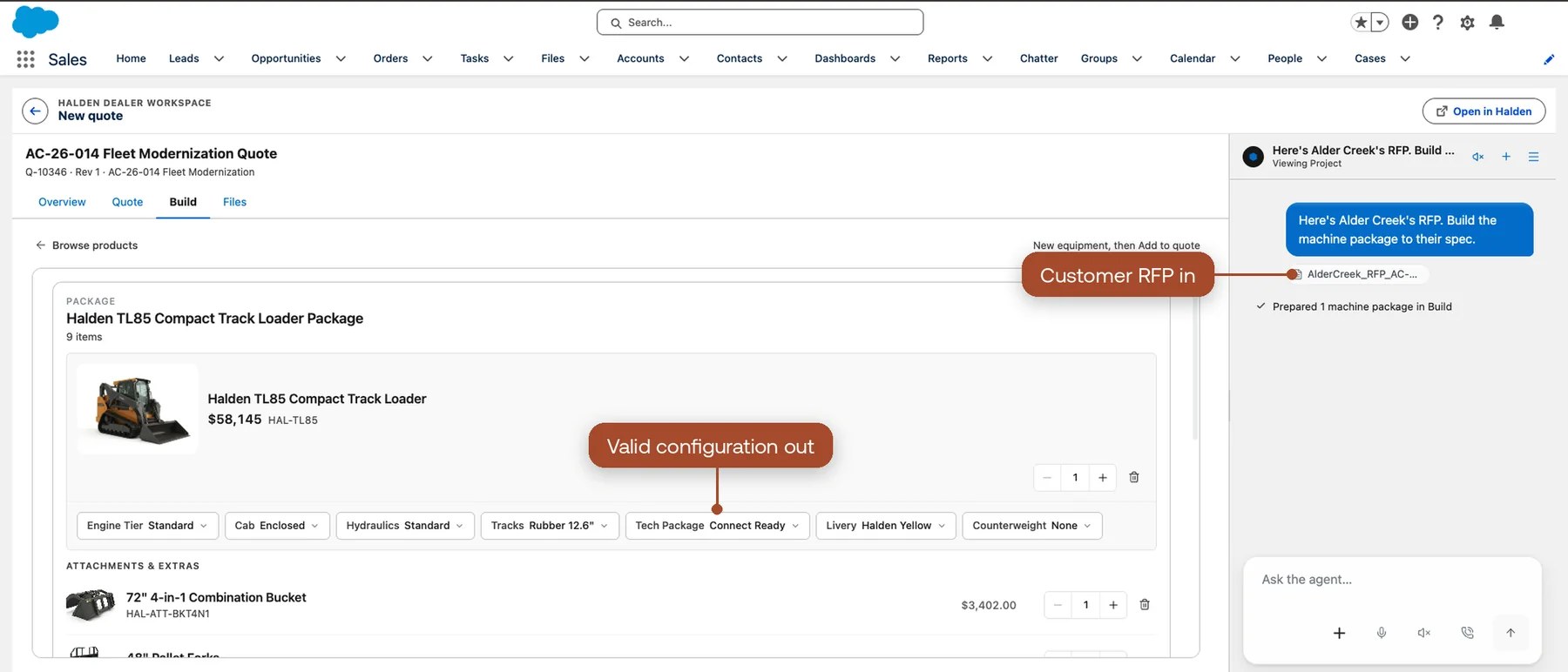
The Threekit Quoting Agent turning customer requirements into a valid configuration, with quote lines in Salesforce CPQ

Now

Reps and dealers get to a correct configuration with less back-and-forth, without waiting for a migration.

Investment

You keep what you have built in Salesforce CPQ or Revenue Cloud.

Later

The configuration work you do in Threekit is ready if you move quoting into Threekit.

Replace Salesforce CPQ and keep Salesforce

Move configuration, pricing and quoting into Threekit. Your reps keep working from the Salesforce opportunity, and the quote comes back to it.

Threekit takes over
  • Product rules and guided configuration
  • Pricing by role, including dealer cost and margin visibility
  • Quote documents, sharing and revisions
Salesforce keeps
  • Accounts, contacts, leads and opportunities
  • Pipeline, forecasting and reporting
  • Your other Salesforce clouds and workflows

What stays outside Threekit: volume pricing, rebates, entitlements, contract pricing and subscription pricing. If you depend on them, plan where they live before you move.

How the CRM connection works →

If you run Salesforce CRM without a CPQ

Add Threekit as your CPQ without buying or implementing another Salesforce product. Your reps start from the opportunity they are already in.
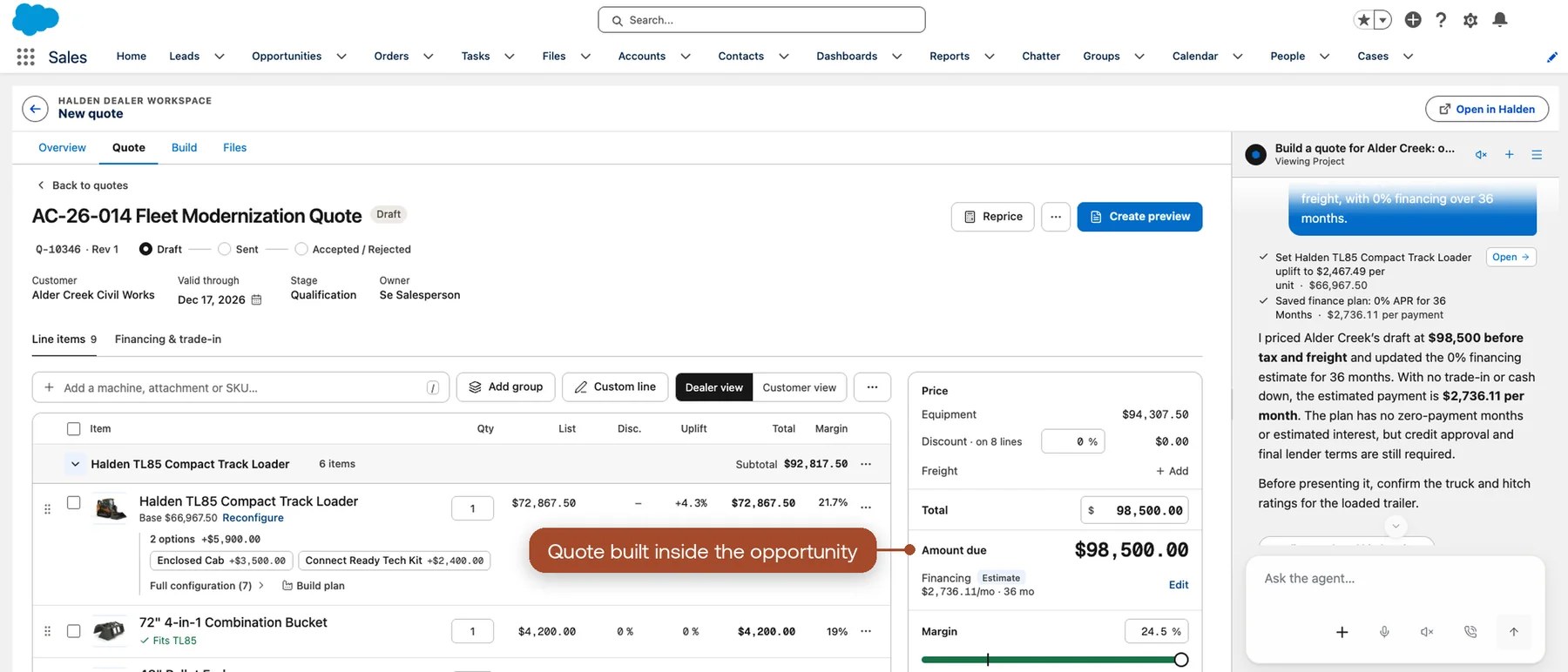
  1. A rep opens an opportunity in Salesforce and starts a quote. Threekit opens inside Salesforce.
  2. The rep configures and prices the product with your rules.
  3. On save, the quote and its products land on the opportunity, and the amount updates for your forecast.
  4. Website visitors and dealers use the same experience. Their requests arrive in Salesforce as leads and opportunities with the configuration attached.
A Threekit quote launched from a Salesforce opportunity, with the quote and products saved back to the record

Where reps work

Quoting inside Salesforce, without a separate login.

Forecast

The opportunity reflects the quote, without anyone retyping it.

Demand

Web and dealer requests reach Salesforce as qualified, configured leads.

If you run Salesforce B2B Commerce

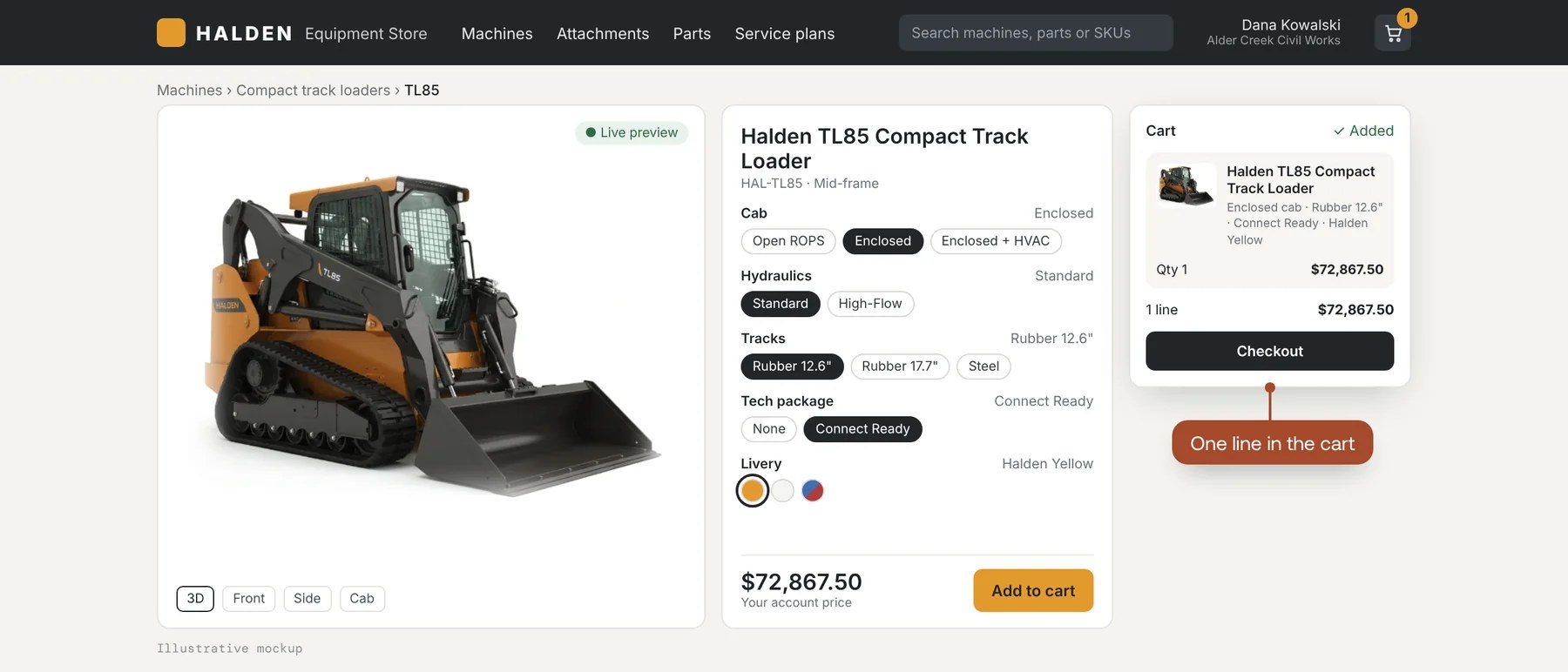
B2B Commerce runs your storefront, accounts and reorders. Configurable products need more than a product page. Threekit adds guided, visual configuration, so buyers order valid configurations without calling a rep.
Threekit does
  • Guides buyers to a valid configuration with your product rules
  • Shows the product as it is configured
  • Sends a complete configuration to the cart
B2B Commerce keeps doing
  • Accounts, buyer access and entitlements
  • Price books, cart, checkout and orders
  • Reorders and order history
Threekit configurator in a B2B storefront: a compact track loader configured with a live 3D preview and added to the cart as one line

Visual configuration, built in

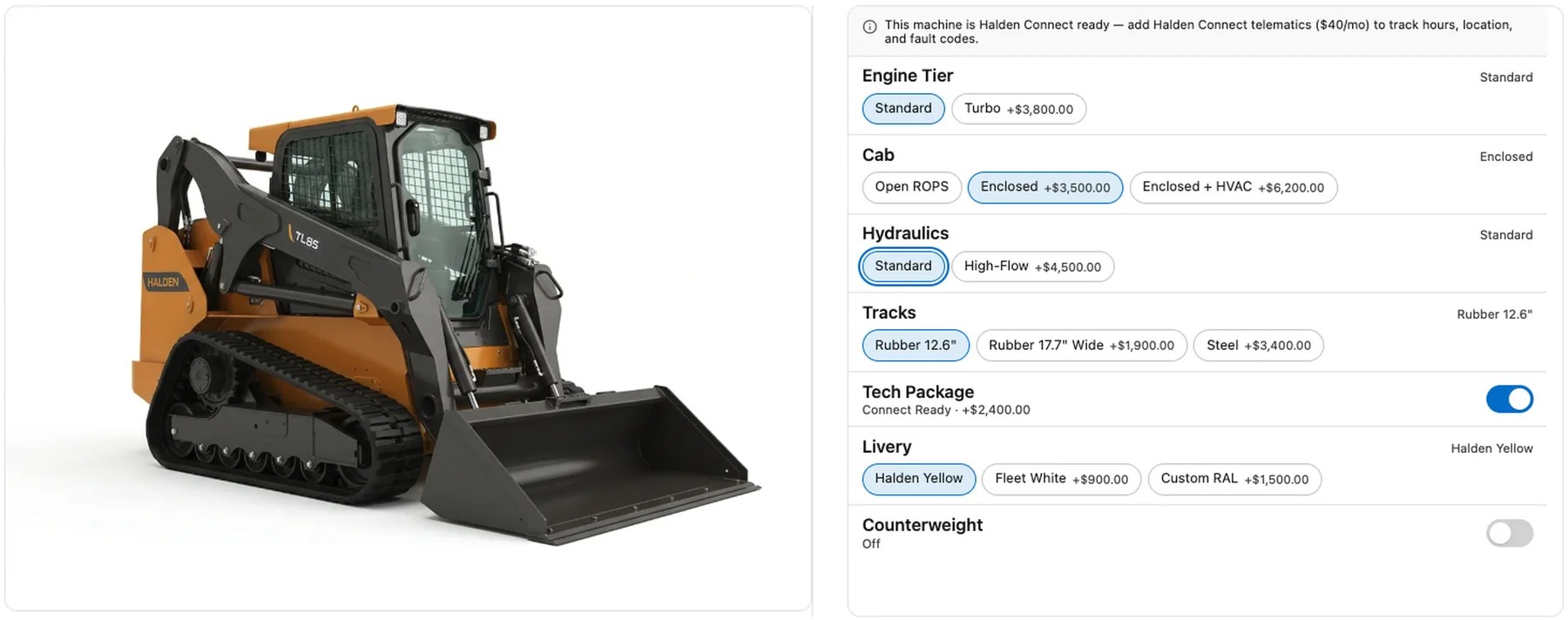
The Visual Configurator shows buyers and sellers exactly what they are configuring, during the sales process and in the quote and proposal. It works with AI-Native CPQ and the Quoting Agent.
Visual Configurator →
Visual Configurator: a 3D compact track loader beside option groups for engine, cab, hydraulics, tracks, tech package and livery, with prices

Salesforce questions

Do we have to leave Salesforce?

No. In every setup Salesforce stays your CRM. Threekit works in front of Salesforce CPQ or Revenue Cloud, as the CPQ for Salesforce CRM, or inside your B2B Commerce storefront.

We are still on Salesforce CPQ. Do we have to decide now?

No. Salesforce continues to support existing Salesforce CPQ customers. You can add Threekit in front of it today and decide what replaces it later.

Is Revenue Cloud the same as Agentforce Revenue Management?

Yes. Salesforce used the Agentforce Revenue Management name from late 2025 and returned to Revenue Cloud in September 2026. Threekit works with it under either name.

Does Threekit replace Revenue Cloud?

Not for contracts, billing or subscription pricing. If you need Revenue Cloud mainly for configuring and quoting products, Threekit can be your CPQ while Salesforce stays your CRM.

Does it work with our other Salesforce clouds?

Threekit connects to the Salesforce records your teams use. Tell us which clouds you run and what should flow where.

Who builds the connection?

Threekit's team builds it with you, or works with your Salesforce partner.

Show us where quoting slows down

Tell us which Salesforce products you run. We will show you where Threekit fits.

Get a Demo